Built in a yeshiva · Set up in an afternoon · Run for you

The whole yeshiva, in one calm place.

Attendance, marks and report cards. Applications, tuition and parent portals. Fundraising. Every person sees just their part — and what's waiting on them today.

Book a live demo See pricing

No monthly fee. A one-time setup, then a simple rate only on payments that go through your system.

yourschool.org — dashboard
Yeshivas Toras EmesRabbi Klein MENAHEL
MENAHEL
Dashboard
Attendance
Grades
Classes
Students
Enrollment
Report cards
Tuition
Good morning, Rabbi Klein
Tuesday, November 10 · כ״ט חשון
Today
Open · attendance taken in 6 of 8 classes
3 out · 1 on permission until 4:00
Needs your attention
Mark Shiur Beis — 11:05→
12 marks to enter→
2 applicants ready for a decision→
4 families behind on tuition→
11:05 · גמרא עיון
MK
Mendel K.
PLA
SB
Shmuel B.late 8 min
PLA
YR
Yossi R.
PLA
DG
Dovid G.absent
PLA
Drawn with made-up names — this is the real layout.
Native, not adapted

Shiurim, sedarim, zmanim, Hebrew names and dates, farhers and mashpiim — it thinks in yeshiva because it was built inside one.

It knows your calendar

Yom Tov and bein hazmanim come pre-filled. On days off nobody is asked to take attendance — no false alarms.

Everyone sees their own

Rebbeim see their classes, mashpiim their bochurim, parents their children. One “needs your attention” list each.

Your own private system

Every school runs on its own isolated system and database. Your talmidim's data is never pooled — and it's yours to export.

Getting started

Set up in an afternoon.

Your admin gets an email, chooses a password and lands on six short steps. A slim bar shows what's next until you're done.

  • School year in one screen — Yom Tov and breaks proposed from the Jewish calendar
  • Grades from a starter set (Mesivta, Zal, Elementary) — rename anything
  • Classes split into groups per grade, each with its own rebbi
  • Students from your spreadsheet — name and grade is enough; parents come along
  • Teachers invited by email; each sees just their own classes
  • Every page explains itself the first time — no manual to read
yourschool.org — settings · school year
Setting up your school 3 of 6 · Next: Your students →
Yeshivas Toras EmesRabbi Klein ADMIN
ADMIN
Dashboard
Attendance
Grades
Classes
Students
Enrollment
Report cards
Tuition
Settings
💡 Days off come from the Jewish calendar — untick any you don't take.
5787 · Tishrei
First day Sept 1 · last day June 24
S
M
T
W
T
F
ש
1
2
3
4
5
6
7
8
9
10
11
12
13
14
15
Time off
☑ Rosh Hashanah1–2 Tishrei
☑ Yom Kippur10 Tishrei
☑ Sukkos break14–23 Tishrei
System 1 · The School System

The school day, without the paperwork.

From the first seder to the report card that goes home.

Attendance

One tap per bochur.

Rebbeim mark from their phone. Late, absent, left early — and the reason, if you track it.

  • Mark everyone present, then change the few who aren't
  • Permissions & leave entered once — they show on every class they miss
  • Davening tracked separately; dorm attendance and phone days if you use them
  • Who's out today, with parents' phones, on one page for the office
11:05 · גמרא עיון
Shiur Beis · Rabbi Klein
✓ All present
8 present · 1 late · 1 absent · 1 on permission
MK
Mendel K.
PLA
LS
Levi S.
PLA
SB
Shmuel B.late · 8 min
PLA
YR
Yossi R.
PLA
DG
Dovid G.absent · sick
PLA
TH
Tzvi H.
PLA
CL
Chaim L.on permission until 4:00
Marks · report cards · behaviour

From the test to the report card.

Marks typed once flow into report cards, made in batches and sent to both parents.

  • Tests to mark come first; your own grading scale — percent, letters or Hebrew
  • Report card batches per class or grade: review, print, send
  • Incidents and knosim with one review page per bochur
  • Mashpiim log sessions in seconds; private notes stay private
  • Dorm houses and rooms; place or move a bochur right on the page
yourschool.org — grades
Yeshivas Toras EmesRabbi Klein TEACHER
TEACHER
Dashboard
Attendance
Grades
Classes
Students
Report cards
💡 Tests waiting for marks come first. Press New test to add one.
Grades
+ New test
To mark 2 In progress 1 Finalized 14
This week
Bava Kamma 2 · Shiur Beis0 of 12
Halacha · Shiur Aleph9 of 14
Chassidus · Shiur Alephavg 91
The year turns over by itself

Next year, already set up.

Plan next year in one place. On the first day it starts on its own — and last year becomes its own archive site.

  • Grades move up, the oldest graduate, rebbeim stay with their grade
  • Families re-register — or everyone simply moves up, your choice
  • Each past year opens as its own archive, untouched by the new one
yourschool.org — set up next year
Yeshivas Toras EmesRabbi Klein ADMIN
ADMIN
Dashboard
Attendance
Grades
Classes
Students
Enrollment
Report cards
Tuition
Settings
5788 starts Sept 7
It starts on its own that morning
How grades move
Shiur Aleph→ Shiur Beis
Shiur Beis→ graduate 🎓
Students next year
21 continuing9 graduating
14 new from enrollment
📁 5787 stays open as its own archive
School System · Enrollment & tuition

From application to signed contract.

Turn it on when you're ready. Every step is yours to shape — and you can see the whole process, step by step, before a single family applies.

The board

Every applicant, at a glance.

Applicants move left to right through your steps. A gold dot means it's your move.

  • Teacher evaluations requested automatically from the school they came from
  • Farher booked online — in person or by video, with calendar invites and reminders
  • Documents, parent interview and handbook signing — only if you use them
  • Acceptance, registration and the tuition contract follow on their own
  • Returning students re-register on their own board — or simply move up
yourschool.org — enrollment
Yeshivas Toras EmesMrs. Gold OFFICE
Enrollment · 5788
Applications open
Applied 4
Moshe F.
Oholei Torah
Yehuda T.
Evaluation 3
Berel M.
received ✓
Eli N.
requested
Farher 2
Zalman R.
Thu 3:30 · video
Aron S.
booked
Decision 2
Sholom D.
Nosson W.
Your forms

Forms you can actually edit.

Start from short, ready forms. Click a question to change it; add more from a side panel of ready-made ones.

  • Plain question types — one choice, several choices, date, file upload…
  • “Show this only if…” — follow-up questions appear only when they apply
  • Registration fills itself in from the application; parents just check it
  • Application and registration fees set in one place — credited to tuition if you like
yourschool.org — forms · application
Yeshivas Toras EmesMrs. Gold OFFICE
✓ All changes saved
Grade applying for · Dropdown
• Shiur Aleph • Shiur Beis
Which yeshiva for the summer? · Short answer
Short answer
👁 Shown only if “Summer plans” is “Yeshiva”
A recent photo · File upload
📎 Upload a file
Optional questions
Father's details+
Health & allergies+
Emergency contact+
Hebrew names+
Tuition

Contracts signed, payments on time.

Price by grade with sibling discounts. Families sign online, choose a plan and pay by card or bank.

  • Card fees your way — the school absorbs them, parents pay them, or parents choose to cover them
  • US and Canadian dollars; autopay, installments and receipts
  • Families grouped by standing — behind, on track, paid up
  • Parents can report a check or transfer they sent, with a photo
yourschool.org — tuition
Yeshivas Toras EmesMrs. Gold BILLING
BILLING
Dashboard
Tuition
Families
Payments
Reports
Tuition · 5787
Billed
$812,400
Collected
$486,150
Still to come
$301,250
Overdue
$25,000
Needs you
3 contracts to be signed→
2 reported payments to confirm→
Included with every system

Parents always know what's next.

Both parents get their own login. Their home page starts with what's waiting on them — or tells them they're all set.

  • Each child: grade, classes, attendance and report cards
  • Tuition, receipts and autopay — self-serve
  • One place for every email the school sends — automatic ones switch on or off, nothing goes out by surprise
  • Emails come from your school's own address
The Rosen family
Waiting on you
Sign Yossi's tuition contractSign
Book Zalman's farherChoose
YR
Yossi · Shiur BeisReport card ready · 97% attendance
›
ZR
Zalman · applyingNext: farher
›
$
TuitionNext payment Dec 1 · autopay on
›
System 2 · The Fundraising System

Fundraising on your own platform.

On its own, or merged with the School System — where your parents and your donors are the same families, in one record.

Campaigns

The campaign that makes your year.

  • Matched campaigns — 2×, 3×, matcher pools and bonus rounds
  • Team pages for bochurim, alumni and families
  • Live donor wall and a full-screen scoreboard for the event
  • Call-center mode with one-click donation links
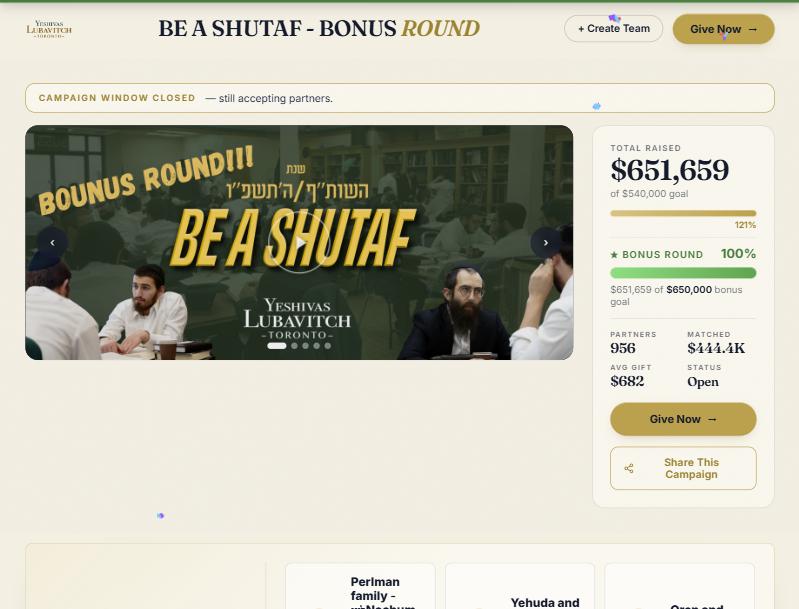
A live matched campaign: $651,659 raised of a $540,000 goal, 956 partners
Our own campaign on this platform: $651,659 raised, 956 partners, 3× matched.
Giving page · donors · receipts

Every gift recorded, every receipt sent.

  • A year-round giving page with sponsorships, monthly giving and dedications
  • Online gifts record themselves; cash and checks in seconds
  • Tax receipts under your own registration — US, Canadian (CRA format) or both
  • Donor history, households, pledges and follow-ups
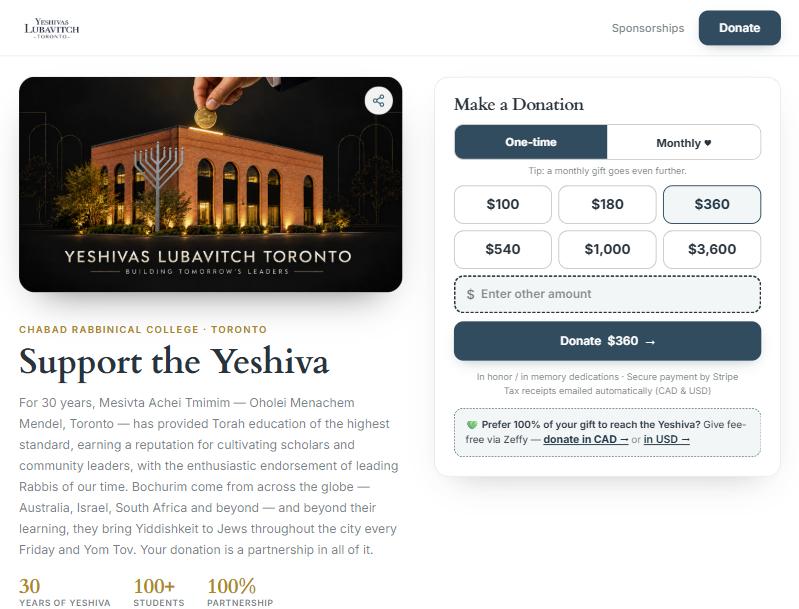
The year-round giving page with amounts, monthly giving and sponsorships
Our own giving page — yours gets your name, photos and amounts.
How it starts

Live in days, not months.

1 · We talk
Your school, your way

Grades, sedarim, staff — and which systems you want now. Anything else can be switched on later.

2 · We set you up
Your own private system

Your name, logo and email address. Your admin gets an invitation and lands on six short setup steps.

3 · You bring your people
Students, teachers, families

A spreadsheet for students; teachers and parents get their own invitations. Every page explains itself.

4 · We run it
Hosting, backups, upgrades

All on us. Need a feature switched on or something changed? Ask from inside your system.

Pricing

One setup fee. No monthly bill.

Pay once to set up. After that we only earn when payments flow through your system — so we're on the same side of the table as you.

The School System
$2,500 one-time
  • Attendance, permissions, davening
  • Tests, marks and report cards
  • Classes, groups, mashpiim, dorms
  • Enrollment, forms and farher booking
  • Tuition contracts and payments
  • Parent and student portals
  • Next-year setup and yearly archives
Book a demo
Most yeshivos
School + Fundraising
$3,500 one-time
  • Everything in the School System
  • Fundraising added for $1,000
  • Parents and donors in one record
  • Campaigns, giving page, receipts
  • Donor CRM, pledges and follow-ups
Get started
The Fundraising System
$1,500 one-time
  • Matched campaigns and team pages
  • Year-round giving page
  • Donor CRM and households
  • US and Canadian tax receipts
  • Call-center mode
Book a demo
Ongoing: no monthly fee

A simple rate on payments processed through your system — tuition, fees and donations:

3%
cards
1%
bank transfers · never more than $15 a payment

You decide who carries card fees on tuition: the school, the parent, or a “cover the fee” option parents can tick.

Add-ons
Compensation · Either system
Staff pay structures, ledgers and balances owed, per program year.
Ask us
Raise · Fundraising System
A guided workspace for donor follow-ups and asks.
Ask us
Custom work
Something only your school needs — asked for from inside your system.
Quoted

Setup covers configuration, importing your data and training. Hosting, nightly backups, upgrades and support are included. Schools that don't process payments through the system pay a small yearly fee from their second year. Prices may change — the price agreed when you sign is the price you pay.

Questions schools ask

Do we have to use everything?

No. Turn on what you need — attendance and grades on day one, enrollment and tuition when you're ready, fundraising whenever. Anything you don't use stays out of everyone's menus.

Is our data separate from other schools?

Yes. Every school runs on its own private system with its own database. Nothing is shared, and you can export everything at any time.

Does it handle Hebrew names and the Jewish calendar?

Throughout. Hebrew names, Hebrew dates and a Hebrew date picker; Yom Tov and bein hazmanim proposed for you, and no attendance asked for on days off.

Our rebbeim aren't technical.

They don't need to be. Each rebbi sees only his own classes; attendance is one tap per bochur, and every page explains itself the first time.

What do parents need?

Nothing to install. Each parent gets an email to choose a password, and their home page shows what's waiting on them.

Who handles payments?

Payments go straight to your school's account through a standard payment processor, in US or Canadian dollars. Card and bank payments, autopay and receipts are built in.

See it with your own school's eyes.

A 30-minute walkthrough on a live demo school — the school day, enrollment and tuition, exactly as your office and rebbeim would use them.

Get started → Book a demo

Or call (416) 787-6631